
Every Sunday I'd make the same promise: this week I'll eat properly. Boil the chana, cook the dal, marinate the chicken, hit my protein every day.
By Wednesday the plan was gone. Not because I didn't know what to eat, but because nothing kept me honest. I'd forget whether I'd had lunch on plan, lose track of how much water I'd had, and the grocery run would leave me with three packets of paneer and no eggs.
So I built FitPrep: a meal prep app for people who already know what they should eat and just need a reason to keep doing it.
The idea: make sticking to the plan feel like winning
Most diet apps ask you to log everything you eat, search a food database and type in grams. That works for a week. Then it becomes homework.
FitPrep flips it. You start with a plan, and your job each day is just to tick it off:
Had your breakfast? Tick.
Drank a glass of water? Tap the glass.
Finished the prep tasks on Sunday? Tick, tick, tick.
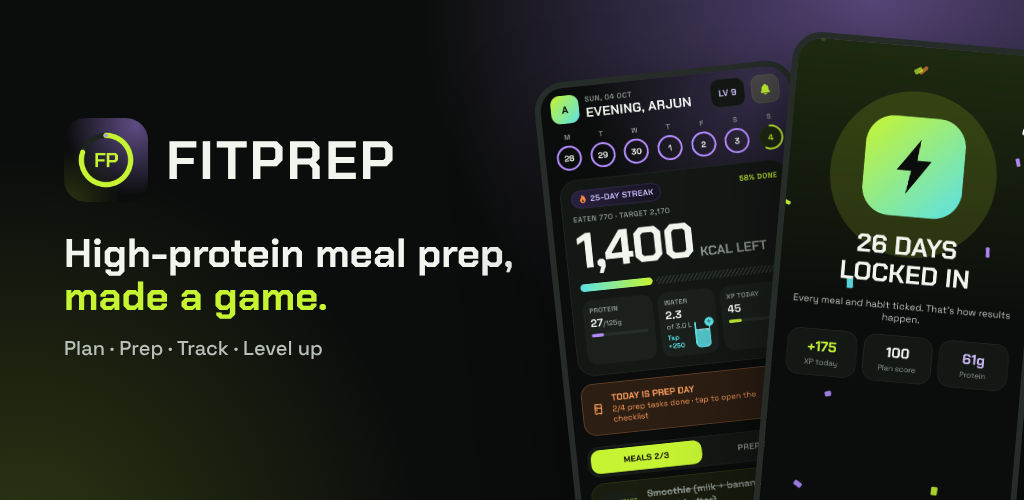
Every tick earns XP. Days stack into a streak. Levels go from Rookie to Mythic. Daily quests ("hit 120 g of protein", "drink 3 litres") add a small challenge. When you complete a perfect day, the app throws you a little celebration.
It sounds silly. It works. Nobody wants to break a 25-day streak over one skipped lunch.
What's inside
A plan that fits an Indian kitchen
FitPrep comes with a ready-made high-protein week: eggs and toast, oats with peanuts, roti with dal, rajma rice, paneer, chicken. Real food that people actually cook at home.
If that doesn't suit you, the AI plan builder asks six questions: your goal, diet type, budget, cooking time, cuisine and anything you want to avoid. It then writes a full seven-day plan, with calories and protein for every meal.
Prep day, built in
Meal prep only works if you actually do the prep. On your prep day, FitPrep puts a big orange card on the home screen: Today is prep day, 0 of 4 tasks done. Tap it and you land on a checklist that sits right next to the day's meals, so you don't have to dig through settings to find it.
A grocery list that knows what's left
This is my favourite feature.
When you build a plan with AI, every meal comes with its real ingredients: 50 g dal, 3 eggs, 1 banana. FitPrep adds these up for the whole week and groups them by aisle. You tick what you've bought.
Then, as you mark meals as eaten, the list counts down. Buy four bananas for Monday and Wednesday, eat Monday's two, and the list shows 2 left. By Wednesday night it says used up. You always know what's still in your kitchen before the next shopping run.
Snap your plate
Ate something that wasn't on the plan? Take a photo. FitPrep estimates the calories and protein so your numbers stay honest. The photo is only used for the estimate and is never stored.
Train too
The Move tab is a simple gym log: Push, Pull, Legs and Full-body templates, sets and reps, a rest timer and personal records. On gym days your protein and calorie targets go up automatically. It's not trying to be a coaching app, just enough to keep training and eating in the same place.
How it's built
FitPrep is a React Native app built with Expo, written in TypeScript.
Design: I rebuilt the whole UI from scratch in a style I call Neon Pulse: lime, violet and cyan on a near-black background, with Chakra Petch for headings and numbers and Space Grotesk for everything else. There's a proper light theme too, chosen in Settings, with the first launch following your phone's setting.
Motion: Reanimated and haptics for the small things: the water glass filling up, the ring drawing in, the celebration burst.
Backend: A small Fastify API on Vercel. The app uses Firebase only for sign-in; every read and write goes through the API, which checks your sign-in on each request.
AI: Google Gemini powers the plan builder, the recipes and the photo scans, with strict response schemas so the app always gets clean, structured data back.
Reminders: These run on the phone, not a server. FitPrep schedules the next seven days of meal reminders with the actual dish name ("Lunch: rajma rice") and Done / Snooze buttons right in the notification. Meals you've already ticked never ping you.
Things that were harder than they looked
Losing a day's progress. An early version saved the empty "today" state to storage before it had finished loading the real one. If you opened the app at the wrong moment, your ticks vanished. The fix was a simple "hydrated" gate: never save until you've loaded. And when two phones disagree, ticks are merged rather than overwritten.
Counting groceries properly. The pantry maths only works if the same ingredient always has the same name and unit. I asked the AI to always use one short name per item ("Moong dal", never "moong daal" on Tuesday), skip spices and oil, and use grams, millilitres or pieces only. Swapped meals don't use up the planned ingredients, because you didn't actually eat them.
Keeping it honest about health. FitPrep gives general guidance, not medical advice, and says so. Photos aren't stored. You can delete your account and every bit of your data from inside the app.
What's next
FitPrep is in internal testing on Google Play right now. Next up:
A shopping list from the AI that also knows what's already in your kitchen
Home-screen widgets for your streak and water
Steps from Health Connect in the Move tab
If you want to try it early or have an idea, get in touch. And if you're a developer curious about any part of the build, from the reminder scheduling to the pantry maths, ask me. I'm happy to write a deeper post on it.
More about FitPrep App here